How Government Agencies Can Build Citizen Trust Through Better Digital Experiences


Thursday, Sep 3rd 2026

Citizen trust is rarely won by a single digital feature. It is built through hundreds of small signals that a public service is clear, dependable and designed around the person using it.

Trust themes aligned with OECD digital-government guidance

A citizen does not experience a government agency as an org chart. They experience a reminder, a form, a portal, a payment request, a decision, a phone call and perhaps a letter. When those touchpoints agree with one another, the service feels competent. When they conflict, trust disappears quickly.

This is why the OECD’s 2025 work on public trust connects trust not only to policy but also to efficiency, citizen engagement and access to public services. Better digital experience is therefore not cosmetic. It affects whether people can understand, complete and rely on public processes.

Trust is an experience outcome

Public-sector digital programmes often begin with a technology target: move the form online, launch a portal, reduce paper or add self-service. Those are useful goals, but they do not automatically create a better experience.

A beautifully designed portal still creates distrust if the confirmation email says something different from the portal. A fast digital form still fails if a citizen with an accessibility need cannot complete it. An automated status message is unhelpful if the call-centre employee cannot see the same status.

The more useful question is: what does the citizen need to believe at each point in the journey? Usually the answer is simple. My information is safe. The organisation knows who I am. The instruction is clear. The process is fair. I can see what happens next. If something goes wrong, I can reach a person.

Six qualities of a trustworthy digital public service

1. Clear

Public communication should explain the action before the policy detail. Citizens need to know what changed, what they must do, by when and what happens if they do nothing. Legal precision still matters, but it should not force every reader to decode administrative language before they can act.

Eclipse content and template management helps organisations centralise approved wording and reusable content so the same rule is not explained six different ways by six departments.

2. Accessible

A digital service is not genuinely digital if part of the population cannot use it. Public bodies already operate under European web-accessibility requirements, and accessibility expectations continue to rise across the wider digital economy.

The W3C WCAG 2.2 standard provides current guidance for accessible web content, including forms. Eclipse also supports accessibility-related output capabilities in its channel layer.

3. Secure without making the citizen carry the complexity

Security is essential, but security that appears as unexplained friction can reduce confidence. Good digital services make identity, consent and data use understandable while applying strong controls in the background.

This becomes even more relevant as the EU Digital Identity Wallet moves towards broad availability. EU rules require Member States to provide wallets by the end of 2026, creating new opportunities for secure identity and attribute sharing across public and private services.

4. Transparent

Citizens should be able to see where they are in a process. “Application received” is better than silence. “We are waiting for document X” is better than a generic delay. “Decision expected by…” is better than forcing the citizen to call for status.

Eclipse Insights provides visibility into the communication chain, while FlexForms can be used for secure, adaptive data capture as part of that journey.

5. Responsive

The journey should react to what the citizen has already done. A reminder must stop after the requested action is completed. A citizen who cannot finish online should be able to move to assisted service without re-entering everything. A failed digital delivery should have a planned fallback.

Scenario management allows “if/then” logic, triggers, waiting periods and channel sequences to be configured around the journey rather than hard-coded into separate systems.

6. Consistent across channels

People use channels according to the task, not according to a neat digital strategy. A portal may be right for a formal decision, SMS for a reminder and a phone conversation for a complex exception. Trust depends on continuity between them.

Eclipse supports communication through channels including email, SMS, WhatsApp, print, user environments and government communication such as MijnOverheid.

The danger of “digital by default” without journey design

Digital-by-default programmes can save time and cost, but they can also move complexity from the organisation to the citizen. A paper form becomes a web form, but the same confusing questions remain. A letter becomes a PDF in a portal, but the citizen still has to phone to understand it. A service is automated, but nobody designed the exception path.

The goal should be digital where it improves access and speed, assisted where human judgement or reassurance matters, and physical where that remains the most appropriate or inclusive channel.

This is consistent with the broader shift described in The Evolution of CCM to CXM: from managing documents to managing the experience around the communication.

How Eclipse supports connected public communication

Eclipse provides a managed communication layer rather than asking an agency to replace every existing system. That distinction matters in government, where core applications often have long life cycles and strict governance.

  1. Connect source systems and structure the customer or citizen data needed for communication.
  2. Centralise approved content and templates while maintaining roles and authorisation.
  3. Create flexible workflows for reminders, document requests, decisions and exceptions.
  4. Use digital and physical channels as one coordinated journey rather than separate programmes.
  5. Collect data through secure, adaptive forms.
  6. Monitor communication history and outcomes so service teams can improve the journey.

The broader set of capabilities is available through the Eclipse CCM as a Service platform and Eclipse services.

Do not automate away the human signal

One of the strongest lessons in the CCM–CXM research supplied to Eclipse is the move from static documents towards dialogue. Citizens still value human connection, especially when the issue is sensitive, unfamiliar or consequential. Automation should therefore remove repetitive work and reduce uncertainty, not make it harder to reach a responsible person.

The best digital experience makes the human interaction better because the employee starts with context. They know what was sent, what the citizen completed and where the journey stopped.

Conclusion

Citizen trust is not a branding exercise. It is the cumulative result of reliable information, accessible design, sensible security, visible progress and respectful hand-offs between digital and human service.

Government agencies do not need to modernise every process at once. Start with a journey where confusion creates high call volumes, missed deadlines or repeated data requests. Connect the data. Simplify the communication. Make the next step visible. Then measure whether citizens are actually finding the service easier to use.

For more practical communication and CX perspectives, visit the Eclipse hub.

Frequently asked questions

How does digital experience affect citizen trust?

Digital experience shapes whether citizens perceive a service as clear, fair, secure and competent. Conflicting messages, inaccessible forms and invisible status can undermine trust even when the underlying policy is correct.

Should government services become fully digital?

Not necessarily. Digital should improve access and speed, but agencies should preserve assisted and physical routes where they are needed for inclusion, complexity or legal reasons.

Why is omnichannel important in government?

Citizens may receive a formal document in a portal, a reminder by SMS and support by phone. The experience is trustworthy only when those channels share the same context and information.

What role does accessibility play?

Accessibility is both a legal and experience requirement. Forms, content and digital interactions should be designed so people with disabilities can understand and complete them.

How can agencies reduce status calls?

Send timely confirmations, explain what is outstanding, provide realistic timeframes and make journey status visible in the citizen’s preferred service environment.

How can Eclipse help public-sector organisations?

Eclipse connects data, governed content, forms, workflows, channels and insight in a managed CCM environment, including support for government communication channels such as MijnOverheid.
B2B customer service dashboards that go beyond reporting


Wednesday, Sep 2nd 2026

Most B2B customer service teams already have dashboards. They can see ticket volumes, response times, open cases, perhaps NPS or CSAT. The problem is not a lack of reporting. The problem is that the report often stops just before the useful question: what should we do differently because of what we can see?

That gap matters more in B2B than in many consumer environments. One account may represent several contacts, contracts, service locations, invoices, delivery commitments and communication preferences. A late answer is not simply one unhappy customer; it can affect a renewal, a payment, an operational deadline or an entire commercial relationship.

The dashboard should mirror the customer relationship, not the org chart

Service data is usually split by system. CRM knows the account and relationship. The ticketing platform knows the case. ERP knows orders and invoices. A communication platform knows what was sent. Marketing automation may know engagement. Each system reports its own truth.

As our article CCM, CRM, and Marketing Automation: Who Does What? explains, these platforms have different centres of gravity. The dashboard becomes valuable when it joins the relevant signals around the account or journey instead of forcing the service team to reconcile them manually.

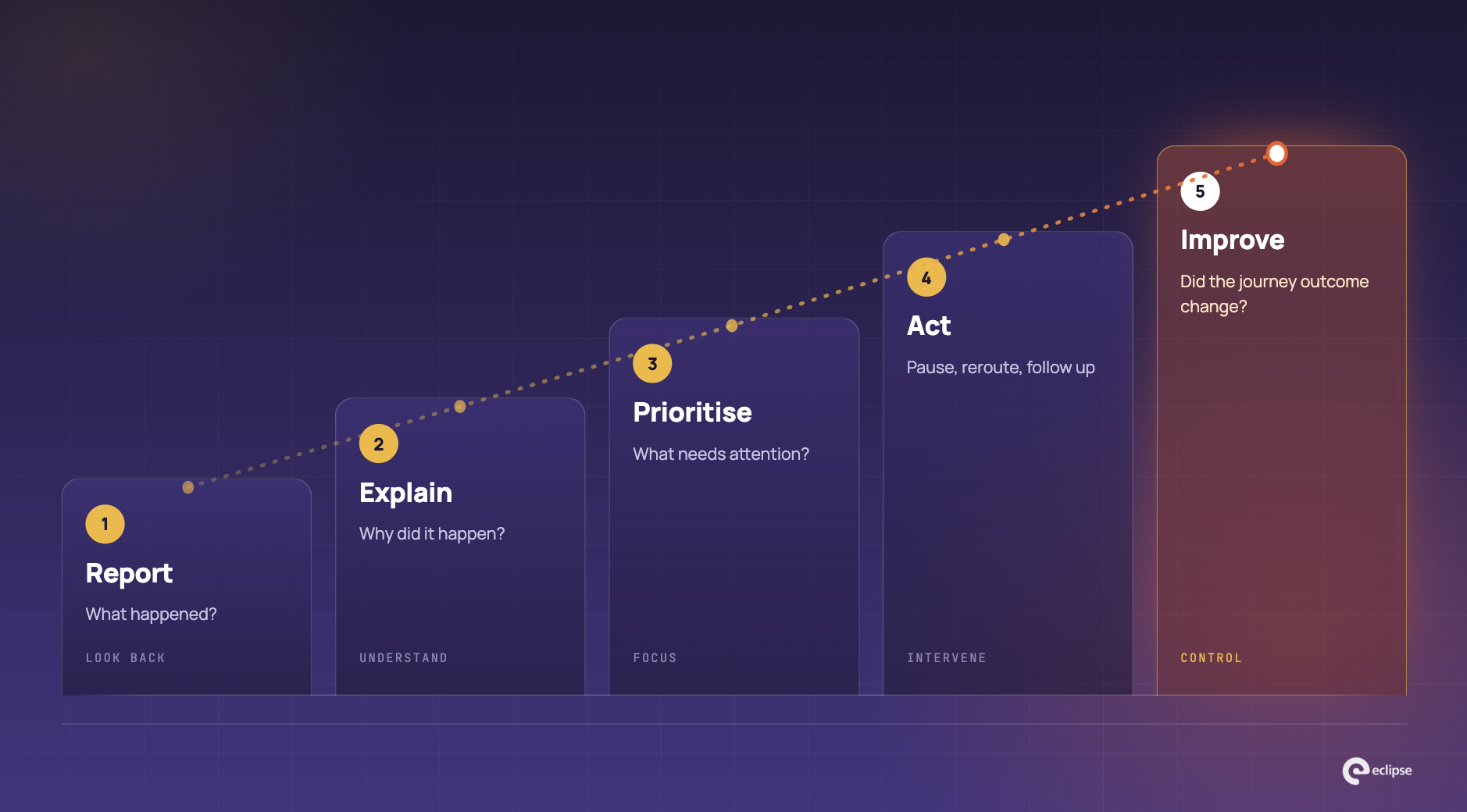
Five levels of dashboard maturity

1. Report: what happened?

This is the familiar layer: number of cases, average response time, communication volume, channel mix, delivery success. It is necessary, but retrospective. It tells you where you have been.

2. Explain: why did it happen?

A better dashboard adds context. Response time rose because one service line had a backlog. Failed communications increased after a data-source change. A spike in calls followed a confusing invoice. The team can move from observation to diagnosis.

3. Prioritise: what needs attention?

B2B service becomes more effective when the dashboard highlights risk, not just volume. Which strategic account has an unresolved communication failure? Which SLA will breach today? Which contract renewal is waiting for customer action? Which invoice reminder has reached the third attempt without response?

4. Act: what can we change from here?

The Eclipse Insights dashboard is designed around the communication chain and allows users to track and analyse communication activity. Because the dashboard is connected to the underlying process, teams can also intervene in communication flows rather than merely export another report.

5. Improve: did the intervention change the outcome?

This is the level many dashboards never reach. A team changes the reminder timing or channel. Did the outstanding action rate improve? A new invoice explanation is introduced. Did clarification calls fall? A service alert is moved from email to SMS for a particular customer group. Did acknowledgement improve?

The dashboard becomes part of a continuous-improvement loop rather than an end-of-month ritual.

What should a B2B customer service dashboard measure?

Area Useful metrics Why it matters
Account health Open critical issues, overdue actions, repeated exceptions Shows relationship risk, not only case volume.
Communication Delivery failure, open/response status, outstanding requests Shows whether customers actually received and acted on key messages.
Service flow Time to first response, time to resolution, SLA-at-risk Makes operational risk visible before breach.
Customer effort Repeat contacts, channel switches, missing-data loops Reveals friction that average handling time can hide.
Commercial moments Renewal tasks, invoice response, consent or contract completion Connects service execution with revenue and retention moments.
Change agility Time to update content, workflow or channel logic Shows whether teams can respond when requirements change.

Do not confuse more data with more insight

A dashboard can become unusable by trying to satisfy every stakeholder. The result is twenty widgets, six filters and no clear hierarchy. The better design begins with the decisions a service team makes each day.

A manager may need account-level risk and SLA performance. A communication specialist may need channel failures and scenario status. A service employee may need the last messages sent to one customer. An operations lead may need outstanding batches and exceptions. The same underlying data can support different views.

Eclipse builds tailor-made KPI-BI dashboards around the goals and roles that matter to the organisation, with real-time information and links to external data where required.

Communication data is often the missing layer

Service dashboards are usually good at cases and weak at communications. Yet many service problems begin with a message: the invoice was confusing, the reminder did not arrive, the customer missed a portal notification, or a contract document was sent to the wrong contact.

Because Eclipse manages the communication chain from data to distribution, its Insights layer can provide history at individual-customer level. That gives the service team evidence of what was sent, through which channel and where the process is now.

For B2B service, this can be extended to account context. A service agent should not need to ask the customer to forward the email they received just to understand the problem.

The dashboard is only as good as the integration underneath it

Real-time views built on overnight spreadsheets are not real-time. A dashboard that cannot reconcile account identifiers across CRM, ERP and communication systems will produce attractive inconsistency.

Eclipse uses application integration and a Canonical Data Model to structure and validate the information used across the communication process.

Turn insight into journey orchestration

The most important leap is from “we can see the problem” to “the process responds to the problem”. If a communication fails, the workflow should select a fallback. If a customer completes the action, reminders should stop. If an SLA is at risk, the account team should be alerted before the customer escalates.

Scenario management and flexible customer journeys make those next actions part of the process design.

A simple dashboard design rule

Every widget should answer one of four questions: What changed? Why does it matter? Who owns the next action? Did that action improve the outcome?

If a metric cannot support one of those questions, it may still be useful for analysis, but it probably does not deserve prime space on an operational service dashboard.

How Eclipse supports B2B service visibility

Eclipse brings together communication data, source-system integration, journey logic and operational dashboards. That combination is useful for B2B organisations because the service relationship is rarely contained in one application.

  1. Connect CRM, ERP, billing, service and communication data.
  2. Create role-based real-time dashboards around the KPIs that matter.
  3. See communication history and outstanding actions in journey context.
  4. Use scenario logic to automate reminders, fallbacks and escalations.
  5. Measure the effect of process changes rather than stopping at activity counts.

For related reading, see The Impact of Modern CCM Solutions on Operational Efficiency and Beyond Boundaries: How CRM Integration with CCM Platforms Empowers the Enterprise.

Conclusion

B2B service dashboards should not become prettier spreadsheets. Their purpose is to reduce the distance between a signal and a useful response.

When account context, service status and communication history are visible together, teams can prioritise the right work, intervene before an SLA fails and learn whether their changes actually improved the customer relationship. That is the difference between reporting and operational control.

Frequently asked questions

What makes a B2B service dashboard different from a B2C dashboard?

B2B service often involves complex accounts, multiple contacts, contracts, SLAs and commercial dependencies. The dashboard must preserve account context rather than treating every interaction as an isolated customer event.

Which metrics should appear first?

Prioritise metrics tied to decisions: SLA-at-risk, unresolved critical issues, failed communications, outstanding customer actions and repeat-contact patterns.

Should NPS or CSAT be included?

They can be useful, but they should sit alongside operational and journey measures that explain what created the experience.

Why include communication data?

Many service issues begin with something the organisation sent or failed to send. Seeing communication history helps service teams resolve the case with context.

Can dashboards trigger actions?

The strongest setup connects insight to workflow. A risk or failure can trigger a reminder, fallback channel, alert or human escalation.

How does Eclipse support B2B dashboards?

Eclipse combines real-time management dashboards with communication-chain insight, integration, a Canonical Data Model and scenario orchestration.