From on-premise to CCM as a service: what changes for your team


Thursday, Nov 12th 2026
The post title next to a grid of circles and quarter circles in Eclipse colours

CCM as a service means a provider runs your customer communication platform for you: the software, the hosting, the upgrades, the security and the daily production runs. Your organisation keeps the content and the decisions: what customers receive, which rules choose who gets which variant, and who approves a change. For the team, the work of keeping a platform alive goes away and more time goes to the communication itself. Business owners make routine content changes themselves in low-code tools, and IT is no longer the queue every edit waits in. Accountability stays with you.

What is CCM as a service?

A customer communications management (CCM) platform produces the letters, statements, emails, SMS and portal messages an organisation sends to its customers. On-premise, you license the software and run it yourself. With CCM as a service (CCMaaS), a provider hosts the platform, keeps it current and runs production under agreed service levels.

🟦 your organisation · 🟧 the provider

Activity Platform you run yourself CCM as a service
Deciding what the customer receives, approving changes 🟦 Business owner 🟦 Business owner
Routine content changes 🟦 Business owner, or IT if the tools are too technical 🟦 Business owner, in low-code tools
Building templates and business rules 🟦 IT 🟧 Provider, on the instruction of the business
Data feeds from source systems 🟦 IT 🟦 IT, with help from 🟧 the provider
Hosting, upgrades and security 🟦 IT 🟧 Provider
Monitoring production runs 🟦 IT 🟧 Provider and 🟦 IT, with the provider able to fix a run remotely
Compliance with sector rules 🟦 Your organisation 🟦 Your organisation

Why do organisations move to CCM as a service?

Usually to put more of their attention on the communication itself, and less on the platform underneath it. Three things change in practice:

  1. Less effort per change. A wording change or a new variant no longer waits for a release window, a server or the one specialist who knows the platform.
  2. A cleaner template estate. Over the years most on-premise platforms collect template sprawl: near copies of the same letter, variants for products that no longer exist, business rules that overrule each other. The move is a natural moment to clear that out, and a provider that has done it before helps decide what to merge, rewrite or retire.
  3. More time for content. Business owners and IT spend their hours on what customers read and on the data behind it, instead of on keeping software running.

Key takeaway: A managed service takes the platform work off your team so the attention goes to what customers read. Clearing out years of overlapping templates and rules is often the biggest gain of the move.

What moves off your team’s plate?

The work that keeps the platform running, which is also the work that is hardest to staff:

  • Patching and upgrading. On-premise, a major version upgrade is a project with its own budget and test cycle. As a service, it is part of what you pay for.
  • Servers, capacity for peak runs such as the annual statement, backups and disaster recovery.
  • Security of the platform and the certification evidence that goes with it.
  • Watching production at night and at month end, and restarting a failed run.
  • Support from a distance. Because the platform runs as a cloud service, the provider can get onto it remotely, pick up a problem straight away and roll out updates without an install round on your own servers.

What stays with your organisation?

Everything that decides what a customer reads, and the responsibility for it:

  1. The content. Wording, mandatory text, design, and the rules for which customer gets which variant.
  2. The approval. Every change is signed off by the named business owner of that document family.
  3. The data. Customer data comes from your source systems. Under the GDPR the provider is a processor that processes personal data only on behalf of the controller.
  4. Compliance. Accountability to your supervisor does not transfer with the work. The provider can produce the documents and the audit trail a regulator expects; answering for them stays with you.

That is the usual split. How independent you want to be, and where you want help, is up to you. Some organisations do all content work themselves from the first day. Others ask the provider to help with work that normally stays in-house, such as preparing template changes for the business owner to approve.

How do roles change in a managed CCM service?

Three roles shift. None of them disappears, and it helps to settle who owns, approves and runs what before the move.

  • Business owners do more themselves. Modern CCM platforms give them low-code editors to change wording or adjust a template within agreed rules, with the approval route as the safety net. Passing every edit through IT is the old way of working.
  • IT moves from running the platform to connecting it. Its work becomes the data feeds from source systems and the security requirements, and it no longer sits between the business and every content change. A CCM as a service provider usually helps build and maintain those connections, but IT stays involved: it knows the source systems and controls access to them.
  • Someone owns the service. A named service owner, often in IT, holds the contract, reads the service reports and is the provider’s counterpart. For many mid-market teams this role is new, and easy to forget.

When does on-premise CCM still make sense?

The classic trade-off is investing up front or paying over time. On-premise, you buy licences and servers and staff the platform yourself. As a service, you pay a fee that usually moves with volume. The market is moving towards subscription and volume-based models, but some organisations still choose to run CCM themselves. That tends to fit in two situations:

  1. Very large scale. Running a platform well brings real technical overhead and investment in servers. That only pays back at very high volumes, and once you include what the migration itself costs.
  2. Deep customisation. An installation of your own can be adapted further than a shared platform. That advantage is smaller than it used to be: with today’s APIs, a standard platform connects to almost any system.

How a managed service like CCMaaS can help

The question usually comes up at a fixed moment: an end-of-support date, a major upgrade with no budget behind it, or the platform specialist handing in notice. Compare the routes then on the team each one needs, how quickly business owners can change content, and how you would leave. Eclipse is one example of a provider that delivers CCM this way. Whichever provider you look at, ask before the demo how they would help clear out your current templates and rules, and how much of the work you can keep in-house if you want to.

Frequently asked questions

Does a CCM as a service provider decide what goes in my letters?
No. The provider builds and runs what the business asks for. The wording, the rules and the approval of every change stay with your business owners.

Do I have to send every content change to the provider?
No. Routine changes such as wording or a new variant of a letter are made by your business owners in low-code tools. The provider takes the technical work, such as a new channel, and helps IT with new data feeds. If you want help with content work as well, you can ask for it.

Who is responsible for compliance when CCM runs as a service?
Your organisation. A provider can produce the documents and the audit records. The obligation to comply, and to give your supervisor access, stays with you.

What happens to our templates and data if we change provider?
That is set in the contract: termination rights, a transition period and export of templates, content and archive in a usable format. The processor agreement states how personal data is returned or deleted.


Related: CCM, CRM and marketing automation: who does what?

If your on-premise platform is heading for its next big upgrade, we are happy to walk through what would move and what would stay.
How to choose a CCM platform: a 10-question checklist


Tuesday, Nov 10th 2026
The post title in large type next to the number 10 in orange

Choosing a CCM platform comes down to ten questions, asked in writing of every vendor on the shortlist and answered with a demonstration on your own documents. Features matter less than they seem, because most enterprise platforms can produce a good letter. What separates them is how they behave after go-live:

  1. Who can change content, and how quickly?
  2. Will you run the platform yourself, or buy it as a managed service?
  3. Which channels does one template reach?
  4. How does data flow from your source systems to the output channels, including print?
  5. Can it handle your peak runs?
  6. Can it prove what each customer received and who approved it?
  7. Where is the data processed, and what security evidence is there?
  8. How is the price built up?
  9. How do your existing templates get onto it?
  10. How do you leave again?

Each question below comes with what a good answer looks like.

Who can change content, and how quickly?

Ask the vendor to show a real change: a clause in a policy letter that legal wants reworded. Watch who makes it and how many steps it takes.

The old way is that every edit goes through IT, joins a release, and reaches customers weeks later. Modern low-code tools let business owners make content changes themselves, inside guardrails that IT sets once: approved content blocks, locked mandatory text, and an approval step before anything goes live.

A good answer: a business owner makes the change in a browser, a second person approves it, and it is in production the same day or the next. If AI helps draft the text, the same approval applies. AI can help draft; a person approves.

Should you run the platform yourself or buy a managed service?

This is the decision that shapes the rest of the checklist, because it decides what your own IT has to staff.

Activity Platform you run yourself Managed service
Hosting, upgrades and monitoring IT Provider
Integrations with source systems IT Provider, per your instructions
Content changes Business owners Business owners
Approval of what customers receive You You
Incident handling IT Both, with the provider able to fix remotely

Running it yourself gives full control and needs IT capacity for a system that is not your core product. A managed service moves the technical work to the provider while the content, the approvals and the responsibility stay with you. Eclipse is one example of the managed route, under the name CCMaaS. That stands for CCM as a service: the provider runs the platform, and you keep the content and the approvals. Who owns, approves and runs what is worked out in more detail in our post on the customer communication operating model.

A good answer from any vendor: a clear list of what they do, what you do, and what that costs, for the model you are buying.

Which channels does one template reach?

Customers receive the same message on paper, by email, by SMS, in a portal and through WhatsApp. In the Netherlands, government bodies also send digital post through the MijnOverheid Berichtenbox, which only organisations connected to MijnOverheid can use.

A good answer: one template and one set of business rules produce every channel, so a wording change is made once. Ask which channels are live for other customers today and which are on a roadmap.

How does data flow from your source systems to the output channels?

Customer data sits in several systems: policy administration, core banking, billing, CRM or case management. One letter often needs data from more than one of them, and every output channel, print included, expects its own format. Questions to ask:

  • Does the platform bring data from different source systems together in one canonical data model, so every template works from the same set of data?
  • What happens when two sources conflict, or a field is missing? Does the run stop, and who is notified?
  • How does it merge records from several sources, and how can you check that the merge was right?
  • How does data move through the platform, and is it encrypted in transit and at rest?
  • How are the output channels connected, including your print partner, and who sees whether each hand-over succeeded?

A good answer: one data model for all templates, written rules for conflicts and gaps with an alert to a named person before anything goes out, encryption along the whole route, and tested connections to every channel and the print partner, with a report of each hand-over.

Key takeaway: A letter is only as correct as the data behind it. Ask to see what the platform does with conflicting or missing data before anything reaches a customer.

Can it handle your peak runs?

Annual statements, indexation letters and tax documents arrive in peaks, which is where scalable CCM earns its keep. Ask the vendor to describe a run at your own peak volume, what happens if it fails halfway, and how capacity grows. Does the platform scale up and down automatically, or does someone have to request extra servers or storage and wait for them?

A good answer: capacity follows the load without a request or a wait and drops back afterwards. The run restarts from the point of failure without duplicates, and you are told what was produced and what was not.

Can it prove what each customer received and who approved it?

Supervisors and auditors ask for one customer’s communication on one date: what was sent, which template version produced it, who approved that version, and whether it was delivered. Our post on the customer communication audit trail sets out what regulators expect here.

A good answer: the platform records all four at production time, for every channel, and you retrieve them for one customer in minutes. A PDF archive alone covers only the first.

Where is the data processed, and what security evidence is there?

Ask for the region where customer data is processed and stored, who at the provider can access it, and which subprocessors are involved. EU rules allow transfers outside the EEA only with special safeguards so that the protection travels with the data. DORA does not impose data localisation, but it does expect a financial entity to know where its outsourced functions are provided and where data is processed.

A good answer: an EU region named in the contract, a current ISO 27001 certificate whose scope covers the service you are buying, and an assurance report such as ISAE 3402 or a SOC 2 Type II report if your auditor asks for one.

How is the price built up?

CCM prices usually have three parts: a licence or subscription, an implementation estimated as hours times a rate, and running costs that are fixed or move with volume. How those parts balance depends on the model:

  • On premise: an upfront investment in licences, infrastructure and implementation, then the cost of your own IT to run and upgrade it.
  • CCM as a service: a smaller upfront investment, mostly implementation, and an operational cost over the contract that covers hosting, upgrades and monitoring.

A good answer: a price you can project over the contract term at your own volumes, including peaks, with every trigger for a change written down. Ask whether the price follows what you actually use, or whether you pay for capacity sized for the peak that sits idle the rest of the year. Ask too what is included in running: upgrades, monitoring, archive and support hours.

How do your existing templates get onto it?

In most selections an existing platform is being replaced. Ask the vendor how they inventory your current templates, how they convert them, and how they prove the new output matches the old. The template count is also where migration estimates most often go wrong.

A good answer: an inventory first, unused templates retired before conversion, and every document family tested side by side on real data before it goes live. Experienced help on the inventory is what makes a faster timeline possible.

How do you leave again?

The best time to agree an exit is before signing. Ask in what format your templates, business rules, content blocks, archive and audit records leave the platform, and how long the provider supports a transition.

Ask too whether your templates could move to another platform at all. Templates built on a widely used composition engine may be easier to move than a proprietary format, so ask which export format they use and whether another platform can read it.

Regulation now backs this up. The EU Data Act has applied since 12 September 2025, requires providers of cloud and software services to remove obstacles to switching, and removes switching charges entirely from 12 January 2027. For financial entities, DORA requires exit strategies for ICT services that support critical or important functions, with a transition period in the contract.

A good answer: export formats named in the contract, a transition period with the provider’s support, and archive access for the full retention period after the contract ends.

Key takeaway: Templates, rules and archive should be able to leave in a format another platform can use. Getting that in writing costs little before signing and a lot after.

How to use the checklist

  1. Send the ten questions in writing to every vendor on the shortlist.
  2. Ask each one to demonstrate the content change and the audit trail question on one of your own documents.
  3. Score the answers yourself, against what your organisation needs, before price enters the discussion.

The written answers then become part of the contract.

Frequently asked questions

Who should be involved in choosing a CCM platform?
The business owners of the main document families, IT, compliance and procurement. Business owners judge content changes and approvals, IT the data flow and integrations, compliance the audit trail. One person owns the final decision.

What should the demonstration on our own documents include?
One of your more complex existing documents, a content change made and approved by a business owner, and the retrieval of what one customer received on one date. Add a test file with a missing or conflicting field to see how the platform reports it.

How many vendors belong on the shortlist?
Few enough to run a demonstration on your own documents with each, in practice three or four. A longer list usually gets a lighter test and answers that are harder to compare.

What is the difference between a CCM platform and a CRM or marketing tool?
A CCM platform produces regulated, personalised documents and messages across channels from governed templates. CRM manages the customer relationship, and marketing automation runs campaigns. See CCM, CRM and marketing automation: who does what?


Related: The evolution of CCM to CXM: from documents to experiences

If you are building a shortlist and want a second view on the answers you get back, we are happy to go through them with you.

A CCM migration roadmap: planning a legacy platform’s end of life in 12 months


Friday, Nov 6th 2026
The post title next to a migration plan with milestones, in Eclipse colours

A workable CCM migration roadmap runs backwards from the date your current platform leaves support or your contract ends. Twelve months is a comfortable horizon for a large estate. The exact plan differs per organisation: it depends on the systems you run today, the capabilities you need next, and the time you have. In outline it has four phases:

  1. Months 12 to 10: inventory and decide.
  2. Months 9 to 7: design the target and clean up.
  3. Months 6 to 3: convert and test in waves.
  4. Months 2 to 0: cut over and decommission.

The order matters more than the exact months. Overruns tend to come from two places: an incomplete inventory, and a platform provider without enough migration experience. That makes the first phase the one that deserves the most care, and professional help with the inventory of your current communications is where outside help pays back most.

Why plan back from the support date?

The support end date, or the contract end date, is the one fixed point in the project. Budgets, vendor choices and team availability all move. The date does not.

Planning forward from “when we have the budget” produces a plan that ends after the date. Planning back from the date shows immediately whether there is enough time, and if there is not, which phase needs more people or a smaller scope.

If the date is not known yet, that is the first task. Ask the vendor for it in writing, for the exact version you run.

Months 12 to 10: what goes into the inventory?

The inventory is a list of everything the old platform does, with an owner for each item. It covers:

  • Templates and document types, marking which ones are still produced
  • Channels and output: print, email, portal, SMS, archive
  • Integrations: source systems, the print and mail provider, the archive
  • Business rules hidden in template logic, such as which clause goes to which customer group
  • Regulatory requirements per document family: mandatory wording, retention periods
  • The business owner who signs off each document family

The phase ends with a decision: upgrade within the current vendor’s line, migrate to another platform, or move to a managed service.

Months 9 to 7: how do you design the target?

This phase decides how much work the next one contains.

  1. Retire before you convert. A template nobody has produced in a year does not move.
  2. Merge variants. Ten versions of the same letter with different footers become one template with shared content blocks. Consolidation can be complex work, and it is also where the largest efficiency gains of the migration sit. Experienced help makes it faster and safer.
  3. Set the operating model. Decide who owns content, who changes templates, who approves and who runs the platform. Writing this down now prevents the old arrangement from being rebuilt by default. For many organisations the right decision here is to hand template management to a specialist. The business keeps deciding what the communications say; the provider makes sure templates are maintained, keep working, and do not multiply into duplicates again.
  4. Plan the waves. Group the work by document family. Start with a family that is simple enough to learn on, then move to the regulated, high-volume families.

Months 6 to 3: how do you convert and test without risk to customers?

Convert one document family at a time. For each family:

  • Run the old and the new platform side by side on the same real data.
  • Compare every document in the run, rather than a sample.
  • Have the business owner from the inventory sign off before the family goes live.
  • Freeze changes on the old platform for that family while it is in migration, so you are not testing against a moving target.

The comparison results and sign-offs double as audit evidence later. Keep them.

Months 2 to 0: what has to be in place at cutover?

  • Cutover per family, not one weekend for everything. A problem then stays contained to one family.
  • Archive access. Documents produced on the old platform have to stay retrievable for their full retention period.
  • A decommission date for the old platform, its servers and its licences, so the two do not run in parallel indefinitely.

The roadmap on one page

Phase Months before the date Main output Owned by
Inventory and decide 12 to 10 Complete inventory, route chosen Business owner of customer communication, with IT
Design and clean up 9 to 7 Reduced template set, operating model, wave plan Business owner, with the platform team or provider
Convert and test 6 to 3 Families converted, output compared, signed off Platform team or provider, sign-off by family owners
Cut over and decommission 2 to 0 All families live, archive reachable, old platform switched off IT, with the business owner

What if you have less than twelve months?

Twelve months is a safe horizon. With a focused effort and experienced help, a migration can move considerably faster. Three things help:

  1. Shrink the scope. Move the regulated and high-volume families first. Retire low-volume documents or keep them briefly on the old platform.
  2. Ask about extended support. Some vendors offer it for a defined period. Get the terms and the end date in writing.
  3. Add capacity from outside. A managed service provider brings the platform team and the conversion work, so your own people can concentrate on the inventory and the sign-offs. Eclipse is one example of that model.

Frequently asked questions

What is a CCM migration roadmap?
A plan for moving templates, business rules, channels and integrations from a legacy customer communications platform to its successor. A good one works back from the support or contract end date and assigns an owner to every phase.

How long does a CCM migration take?
With a focused effort, a small, well-documented estate can move in a month or two. A mid-market estate usually takes several months, with discovery and testing taking most of the time.

Who should own the migration?
The business owner of customer communication, working with IT. The business rules and the approvals sit with the business, so a migration run by IT alone tends to discover them late.

Should we migrate everything at once?
No. Migrating in waves by document family limits the risk to one family at a time and lets the team learn on the simpler ones first.

What is the biggest risk?
Business rules nobody documented, which surface during testing instead of during the inventory.

When should you contact potential new suppliers?
As early as possible, ideally before the inventory starts. An experienced provider has been through every step of a migration, including the inventory and the discovery of business rules hidden in template logic, and can make both faster and more complete.


Related: CCM, CRM and marketing automation: who does what?

If your support date is closer than twelve months, this is a plan we help put together most weeks. Happy to work through yours.

What a CCM migration actually costs, and where estimates go wrong


Monday, Nov 2nd 2026
The post title next to a cost estimate with the total highlighted, in Eclipse colours

A CCM migration has three cost components, one for each stage of the project:

  1. Investigation: finding out what the old platform actually does, and choosing the route.
  2. Implementation: rebuilding templates, business rules, channels and integrations on the new platform, and testing them.
  3. Running: the platform after go-live, including the licence or service fee.

The estimate that reaches the board usually holds a licence and a conversion quote. Investigation is often missing, and running costs are left to a later budget. Those two lines decide whether the project lands on budget.

What are the cost components of a CCM migration?

Component What is done How it is usually priced
Investigation Inventory of templates, business rules, channels, integrations and owners; choice of route Estimated hours times an hourly rate, often as a separate first phase
Implementation Templates and logic rebuilt on the new platform, output tested, sign-off per document family Estimated hours times an hourly rate
Running Platform, hosting, upgrades, support and archive after go-live A licence plus your own team, or a primarily volume-based fee

What happens in the investigation stage?

The investigation writes down what the old platform does: every template still in use, every channel, every integration with a source system or a print provider, every business rule buried in template logic, and the business owner who signs off each document family.

Most organisations assume this list exists. What exists is usually a folder of templates and a few people who remember why a particular clause goes to a particular customer group. Skipping the investigation does not save the work. It moves it into implementation, where it is more expensive and comes later.

The stage ends with a choice of route: upgrade with the current vendor, migrate to another platform, or move to a managed service. That choice sets the cost of the other two stages.

How is implementation priced?

Implementation is usually quoted as an estimate of hours times an hourly rate. The hours depend less on the number of templates than on the logic inside them: which variant is sent when, which clauses are mandatory for which product, which data field drives which paragraph. A letter with thirty conditional branches takes many times longer to rebuild than a letter with none, and both count as one template.

Two things keep the estimate honest:

  1. Retire before you convert. A template nobody has produced in a year does not move, and does not get paid for. This is where experience pays off: a CCM partner that has done this before knows which templates can go, which can be merged, and where the logic is hiding, and reaches that shortlist in less time than an internal team working from the folder.
  2. Agree what the estimate covers before you accept it. It should include the business rules and the comparison of old against new output on real data. Anything that is not in the estimate is added later, at the end of the project, when there is no room left to say no.

How are running costs priced?

Running costs usually follow one of three models:

  1. Licence model. A licence or subscription for the platform, plus your own team to run it, the infrastructure, the upgrades and the archive. Each of these is a separate line, and most of them sit outside the project budget.
  2. Buying the software. A one-off purchase of a perpetual licence, with a yearly maintenance fee on top and the same team, infrastructure and upgrades as the licence model. This used to be the norm and is now rare, as vendors have moved to subscriptions.
  3. Volume-based managed service. A primarily volume-based fee, set by the number of communications you send, covering the platform, hosting, upgrades and support. Eclipse prices its managed service this way, so the cost moves with what you actually produce.
Upgrade with the current vendor Migrate to another platform Managed service
Pricing basis Licence plus your own team Licence plus your own team A primarily volume-based fee
Platform team Retained Retained, retrained Not needed; the provider runs it
Upgrades and patching Yours Yours Usually included in the fee

Whichever model you choose, the old platform keeps costing money until it is switched off. Put its decommission date in the plan and in the budget.

How to build an estimate that holds

  1. Get the support end date or contract end date in writing.
  2. Fund the investigation as its own stage, before anyone quotes implementation.
  3. Retire unused templates and merge variants before counting what moves.
  4. Agree what the implementation estimate covers, including business rules and testing, before you accept it.
  5. Add the running cost of the first two years for each route, including the old platform until it is switched off.

Then compare the routes on the total of all three components, not on the licence.

Frequently asked questions

How much does a CCM migration cost?
There is no useful single figure. The total depends on the number of document families, the business rules inside them, the channels and integrations involved, and the running model you choose. A complete estimate covers investigation, implementation and running.

What is the biggest hidden cost in a CCM migration?
Business rules that nobody documented. They are invisible in a template count and surface late, when they are rebuilt under time pressure. A proper investigation is the cheapest way to find them.

Is a managed CCM service cheaper than running the platform yourself?
That depends on your volume and on the team you would otherwise keep. A primarily volume-based fee makes the cost easy to forecast and replaces a staffing problem with a contracted service.

How long does the old platform keep costing money?
Until it is decommissioned. Put a decommission date in the plan and in the budget.


Related: Understanding the cost and value of CCM solutions and CCM, CRM and marketing automation: who does what?.

If you are putting a migration estimate in front of a board this quarter, this is the breakdown we walk through most weeks. Happy to go through yours.

Customer communication audit trail: what regulators expect


Tuesday, Oct 27th 2026
The post title in large type next to a shield with a check mark in orange

A regulator, an auditor or a court asks the same question in different words: show me what this customer received, when, who approved it, and why this version. A customer communication audit trail answers that question from records, not from memory. For every communication that leaves the organisation it holds five things:

  1. The exact content the customer received, as rendered, on the channel it went out on, kept for the full retention period.
  2. The version of the template and the business rules that produced it.
  3. The customer data the rules were applied to, or a reference to it, so the variant can be explained.
  4. Who approved that version, and when.
  5. Evidence of delivery, or of the failure to deliver.

Few organisations can produce all five. The gap is usually the approval record, and the link between the archived document and the template version that made it.

What does a customer communication audit trail have to prove?

Three things, and they are different questions.

  • Content. That this customer received this text, with this clause, on this date. A PDF in an archive proves the first part. It does not prove the clause was the approved one at the time.
  • Control. That the text was approved by the right person before it was used, and that nobody changed it between approval and production. This is the part a regulator looks at when something has gone wrong.
  • Delivery. That the communication reached the customer, or that the organisation knows it did not and acted on that.

A trail that proves content but not control is a filing system. A trail that proves control but not delivery is a change log. Supervisors expect all three.

Which rules ask for it?

No single regulation says “keep an audit trail of customer communication”. The requirement is assembled from several that do, each from a different angle.

Rule What it asks What it means for the trail
GDPR, Article 5(2) The controller must be able to demonstrate compliance with the data principles Records of what personal data was used, for which communication, under which rule
GDPR, Article 12 Information to the data subject must be concise, transparent and accessible The privacy information that accompanies a communication must be reproducible for each version sent
Insurance Distribution Directive, Article 23 Information to customers is provided on paper or another durable medium A retrievable copy of exactly what the customer was given, accessible for as long as the information is relevant to the customer
DORA, Articles 28 and 30 Financial entities stay responsible for ICT services they outsource, with contractual access and audit rights If a provider produces the communication, the trail must still be available to you and to your supervisor

Sector rules add retention periods per document type, mandatory wording per product and deadlines for informing customers of specific events. The structure above is the same in every sector.

What should the trail record per communication?

The practical answer is a record with five fields, created at the moment of production, completed with the delivery status as it comes in, and not editable after that.

Field What it holds Where it usually lives
Rendered output The document or message exactly as sent, per channel Archive
Template and rule version Identifier and version of the template, the content blocks and the business rules applied Platform change history
Data snapshot The customer data the rules were applied to, or a reference to it Platform or source system
Approval record Who approved this version of the template and the rules, when, and what changed from the previous version Platform workflow, too often email
Delivery event Sent, delivered, bounced or rejected, with timestamp and channel Platform and channel providers

The fourth field is the one to check first. A customer communication operating model names an accountable owner per document family; the audit trail is where that ownership becomes evidence. If approvals live in email threads, the trail breaks at exactly the point a supervisor will test.

Where do audit trails usually fail?

In four places, and rarely in the archive itself.

  1. The template changed after approval. A text correction goes straight to production because the approval route takes a week. The archive shows the corrected letter; the approval record shows the previous one.
  2. The archive holds a PDF, not the inputs. The organisation can show what the customer received, but not which rule decided that this customer got this variant. The question “why did this customer get this clause” cannot be answered.
  3. Delivery is assumed. Print and mail went out, the email was sent, the SMS batch was handed to the provider. Nobody records that the provider rejected part of the batch, or who followed up.
  4. The trail stops at the channel boundary. The letter is archived. The portal message, the app notification and the SMS that pointed to it are not, so the same customer has three partial trails.

Each of these is a design problem, not a discipline problem. A platform that records the five fields at production time removes them.

Key takeaway: You should be able to show the exact communication a customer received, and the template version that produced it, even after someone has changed that template.

What changes when AI drafts the communication?

Nothing in the list above, and one thing in practice. When a prompt produces the draft of a template or a journey step, the approval record has to show that a named person reviewed the draft and approved it before it was used, and what that person saw. An AI-drafted change without an approval record is an unapproved change, and the trail should make that visible rather than hide it.

What changes when a provider runs the platform?

The responsibility does not move. Under DORA, a financial entity that outsources the production of customer communication keeps the obligation to demonstrate control, and the contract has to give it and its supervisor access to the records. In practice that means three things to settle before signing:

  1. The five fields above are produced by the provider and are yours, exportable in a usable format, for the full retention period.
  2. The approval workflow runs on your owners and your approvers, not the provider’s staff.
  3. Audit and access rights are written into the contract, including after it ends.

A managed service, Eclipse is one example, is set up to keep those records as part of normal production. In Eclipse you can retrieve the original document and the exact communication that was sent, to whom and when, together with the version of the template and scenario that produced it. If someone updates that template or scenario later, the original stays retrievable. The contract is still where the obligation lives, so read that part of it with the audit trail in mind.

How to test your own trail in an afternoon

  1. Pick one document family that carries mandatory text, such as a policy document or an annual statement.
  2. Take one customer and one date from the last year.
  3. Retrieve the rendered output, the template version, the approval record and the delivery event for that one communication.
  4. Time how long it took and count the people you had to ask.

If the answer came from one system in minutes, the trail works. If it came from three people and an email search, the gap is found before a supervisor finds it. The same test belongs in the inventory phase of a migration roadmap, because a platform move is when the old trail is most at risk.

Frequently asked questions

What is a customer communication audit trail?
The set of records that shows, for each communication sent to a customer, what was sent, which template and rules produced it, who approved that version, and whether it was delivered. It is kept for the retention period of the document and must be retrievable on request.

Is an archive of PDFs enough?
No. An archive proves what the customer received. It does not prove the content was approved, by whom, or why this customer received this variant. Those answers need the template version, the approval record and the data reference as well.

How long must customer communication be kept?
It depends on the document type and the sector. Retention periods come from the applicable financial, pension, tax and data protection rules, and the longest one that applies to a document family sets the period for that family. The platform should hold the period per family rather than one blanket setting.

Who is responsible for the audit trail when communication is outsourced?
The organisation that sends the communication. A provider can produce and store the records, but the obligation to demonstrate control, and to give the supervisor access to the records, stays with the regulated entity.


Related: CCM, CRM and marketing automation: who does what?

If your next audit will ask for one of these records and you are not sure which system holds it, we are glad to help you look.

Customer communication operating model: who owns, approves and runs what


Wednesday, Oct 21st 2026
The post title next to a grid of circles and quarter circles in Eclipse colours

In a regulated enterprise, customer communication works when every document family has one accountable business owner. That owner decides what the customer receives and signs off every change. Legal and compliance approve the mandatory text, and your IT or a provider runs production. Failed deliveries are followed up together. A customer communication operating model writes this down per activity, so that a change, a failed run or a regulator’s question always lands with a named person.

Most organisations have the people. What they lack is the line between them.

What does a customer communication operating model cover?

It covers the full life of a communication, from the first draft to the archived copy. In practice that is seven activities:

  1. Wording and design of the communication.
  2. Mandatory and legal text: clauses, disclosures, product-specific notices.
  3. Data and business rules: which customer gets which variant, and why.
  4. Building and changing templates and journeys.
  5. Approving a change before it goes live.
  6. Running production and monitoring delivery across channels.
  7. Handling failures, complaints and archive requests afterwards.

A document family is the natural unit of ownership: all annual statements, all payment reminders, all policy documents for one product line. Ownership per template is too fine to manage. Ownership per department is too coarse to hold anyone to account.

Who should own customer communication?

The business line that owns the product owns the communication about it. The pension administrator owns the annual pension statement. The collections team owns the payment reminder. Marketing owns the campaign, and only the campaign.

One common alternative tends to fail: IT as owner. Passing every edit through IT is the old way of working. It made sense when changing a letter meant changing code. Modern low-code tools let business owners change their own communications, with IT looking after the platform rather than the wording.

Who does what: in-house platform or managed service?

The owners above stay the same whatever platform you choose. What moves is the work around them. With a platform you run yourself, your IT builds, runs and fixes it. With a managed service, those tasks move to the provider, and your organisation keeps the decisions.

🟦 your organisation · 🟧 the provider

Activity Platform you run yourself Managed service (CCMaaS)
Content, routine changes and sign-off 🟦 Business owner 🟦 Business owner
Mandatory and legal text 🟦 Legal and compliance 🟦 Legal and compliance
Building templates, data and business rules 🟦 IT 🟧 Provider, as instructed by the business
Running production, upgrades and security 🟦 IT 🟧 Provider
Monitoring delivery and failed runs 🟦 IT 🟦🟧 Both, and the provider can fix issues remotely when needed
Archive and audit evidence 🟦 IT 🟧 Provider runs it for you, 🟦 the data stays yours and you and your supervisor have access

Two rules hold in both models:

  1. Each activity has one accountable owner, even when the provider does the work or the work is shared. If two parties claim it, nobody has it.
  2. The approver of a change is a named person, recorded per document family, with a named deputy.

Where does ownership usually break down?

In the same five places, across sectors:

  • Failed deliveries. The platform reports that a batch of SMS messages was rejected. Nobody owns the customers who received nothing, so nothing happens.
  • Business rules. Legal approves the wording of a letter and never sees the data rule that decides who receives it. The wrong customer group gets a correct letter.
  • Knowledge in one person. The person who knew why a clause goes to one customer segment changes role, and the reason leaves with them.
  • Changes outside the process. A small text change goes straight to production because the approval route takes a week. The audit trail shows a gap exactly where a regulator would look.
  • Changes only IT can make. If every wording change needs a developer, the business owner owns the letter on paper only. The platform has to be simple enough for business owners to make routine changes themselves, with the approval route as the safety net and IT free for the work that needs it.

Who signs off when AI drafted the change?

CCM platforms are starting to replace low-code screens with a prompt: a business owner describes the change, and the platform builds the form, the template or the journey step. That makes drafting fast. It does not change who answers for the letter that goes out.

Supervisors take the same view. In its opinion on AI governance and risk management of August 2025, EIOPA expects insurers to apply their existing governance responsibilities to AI systems, including human oversight and record-keeping. Since February 2025, Article 4 of the EU AI Act has also required organisations that deploy AI to make sure their staff understand it well enough to use it.

For customer communication, that translates into four conditions:

  1. AI produces a draft, never a live change. The draft goes through the same approval route as a change made by hand.
  2. The approver is the business owner of that document family. AI does not create a new owner, and it should not create a shortcut around the existing one.
  3. The approver sees exactly what changed. New and changed elements shown side by side with the live version, plus a note of what the AI looked at.
  4. The approval is kept. Who approved, when, which version. That record is the audit evidence.

Eclipse applies the same principle as AI assistance comes into its platform: AI proposes a draft, and a named person decides.

The effect on the operating model is that the bottleneck moves. Building gets faster, so approving becomes the step that decides speed and quality. Organisations that have named owners per document family absorb that easily. Organisations that have not will find the gap faster.

How a managed service like CCMaaS can help

A managed service, also called CCM as a service (CCMaaS), takes over the work that sits furthest from the business: building templates and making technical changes, running production, upgrades and security, monitoring delivery, and running the archive on your behalf. That leaves your organisation with the part only it can do: deciding what customers receive and approving every change.

It helps the operating model in three ways:

  1. Fewer roles to staff. You no longer need your own platform team for a system that is not your core product.
  2. Approval routes built in. A good provider sets up the approver per document family in the platform, so every change follows the agreed approval route rather than email.
  3. Business owners in control. Business owners make routine content changes themselves, in intuitive low-code tools, while the provider handles the technical work behind them.

Three things stay with you in any model: one named owner per document family, with a deputy; the approval itself; and a decision on how AI-drafted changes are approved before anyone uses AI in production. Check the contract for the rest, in particular who contacts customers after a failed delivery and how you and your supervisor reach the archive.

Frequently asked questions

What is a customer communication operating model?
It is the agreement on who decides, builds, approves, runs and follows up each customer communication. It is usually written down as a table of activities and owners per document family, and it is what makes approval routes and audit trails meaningful.

Should IT or the business own customer communication?
The business line that owns the product owns the communication about it. IT, or a managed service provider, is responsible for running the platform and production. Splitting it this way gives each side decisions it is equipped to make.

Who approves an AI-generated letter or template?
The same person who approves a change made by hand: the business owner of that document family, with legal and compliance signing off mandatory text. AI can help draft; a person approves.

How many approvers does a change need?
One is usually sufficient: the business owner of the document family. Legal and compliance sign as well only when mandatory text or a disclosure is touched. More signatures tend to slow changes down without making them safer.

Does a managed CCM provider decide what goes in my letters?
No. The business owner decides what customers receive and signs off every change. The provider implements as instructed and runs the platform.

Do I have to send every content change to the CCMaaS provider?
No. On a modern platform you make content changes yourself, in intuitive low-code tools, and the provider supports you with the technical work behind them.


Related: CCM, CRM and marketing automation: who does what?

If you are working out who signs off what, especially now AI is entering the build step, we are glad to compare notes.

How Government Agencies Can Build Citizen Trust Through Better Digital Experiences


Thursday, Sep 3rd 2026

Citizen trust is rarely won by a single digital feature. It is built through hundreds of small signals that a public service is clear, dependable and designed around the person using it.

Trust themes aligned with OECD digital-government guidance

A citizen does not experience a government agency as an org chart. They experience a reminder, a form, a portal, a payment request, a decision, a phone call and perhaps a letter. When those touchpoints agree with one another, the service feels competent. When they conflict, trust disappears quickly.

This is why the OECD’s 2025 work on public trust connects trust not only to policy but also to efficiency, citizen engagement and access to public services. Better digital experience is therefore not cosmetic. It affects whether people can understand, complete and rely on public processes.

Trust is an experience outcome

Public-sector digital programmes often begin with a technology target: move the form online, launch a portal, reduce paper or add self-service. Those are useful goals, but they do not automatically create a better experience.

A beautifully designed portal still creates distrust if the confirmation email says something different from the portal. A fast digital form still fails if a citizen with an accessibility need cannot complete it. An automated status message is unhelpful if the call-centre employee cannot see the same status.

The more useful question is: what does the citizen need to believe at each point in the journey? Usually the answer is simple. My information is safe. The organisation knows who I am. The instruction is clear. The process is fair. I can see what happens next. If something goes wrong, I can reach a person.

Six qualities of a trustworthy digital public service

1. Clear

Public communication should explain the action before the policy detail. Citizens need to know what changed, what they must do, by when and what happens if they do nothing. Legal precision still matters, but it should not force every reader to decode administrative language before they can act.

Eclipse content and template management helps organisations centralise approved wording and reusable content so the same rule is not explained six different ways by six departments.

2. Accessible

A digital service is not genuinely digital if part of the population cannot use it. Public bodies already operate under European web-accessibility requirements, and accessibility expectations continue to rise across the wider digital economy.

The W3C WCAG 2.2 standard provides current guidance for accessible web content, including forms. Eclipse also supports accessibility-related output capabilities in its channel layer.

3. Secure without making the citizen carry the complexity

Security is essential, but security that appears as unexplained friction can reduce confidence. Good digital services make identity, consent and data use understandable while applying strong controls in the background.

This becomes even more relevant as the EU Digital Identity Wallet moves towards broad availability. EU rules require Member States to provide wallets by the end of 2026, creating new opportunities for secure identity and attribute sharing across public and private services.

4. Transparent

Citizens should be able to see where they are in a process. “Application received” is better than silence. “We are waiting for document X” is better than a generic delay. “Decision expected by…” is better than forcing the citizen to call for status.

Eclipse Insights provides visibility into the communication chain, while FlexForms can be used for secure, adaptive data capture as part of that journey.

5. Responsive

The journey should react to what the citizen has already done. A reminder must stop after the requested action is completed. A citizen who cannot finish online should be able to move to assisted service without re-entering everything. A failed digital delivery should have a planned fallback.

Scenario management allows “if/then” logic, triggers, waiting periods and channel sequences to be configured around the journey rather than hard-coded into separate systems.

6. Consistent across channels

People use channels according to the task, not according to a neat digital strategy. A portal may be right for a formal decision, SMS for a reminder and a phone conversation for a complex exception. Trust depends on continuity between them.

Eclipse supports communication through channels including email, SMS, WhatsApp, print, user environments and government communication such as MijnOverheid.

The danger of “digital by default” without journey design

Digital-by-default programmes can save time and cost, but they can also move complexity from the organisation to the citizen. A paper form becomes a web form, but the same confusing questions remain. A letter becomes a PDF in a portal, but the citizen still has to phone to understand it. A service is automated, but nobody designed the exception path.

The goal should be digital where it improves access and speed, assisted where human judgement or reassurance matters, and physical where that remains the most appropriate or inclusive channel.

This is consistent with the broader shift described in The Evolution of CCM to CXM: from managing documents to managing the experience around the communication.

How Eclipse supports connected public communication

Eclipse provides a managed communication layer rather than asking an agency to replace every existing system. That distinction matters in government, where core applications often have long life cycles and strict governance.

  1. Connect source systems and structure the customer or citizen data needed for communication.
  2. Centralise approved content and templates while maintaining roles and authorisation.
  3. Create flexible workflows for reminders, document requests, decisions and exceptions.
  4. Use digital and physical channels as one coordinated journey rather than separate programmes.
  5. Collect data through secure, adaptive forms.
  6. Monitor communication history and outcomes so service teams can improve the journey.

The broader set of capabilities is available through the Eclipse CCM as a Service platform and Eclipse services.

Do not automate away the human signal

One of the strongest lessons in the CCM–CXM research supplied to Eclipse is the move from static documents towards dialogue. Citizens still value human connection, especially when the issue is sensitive, unfamiliar or consequential. Automation should therefore remove repetitive work and reduce uncertainty, not make it harder to reach a responsible person.

The best digital experience makes the human interaction better because the employee starts with context. They know what was sent, what the citizen completed and where the journey stopped.

Conclusion

Citizen trust is not a branding exercise. It is the cumulative result of reliable information, accessible design, sensible security, visible progress and respectful hand-offs between digital and human service.

Government agencies do not need to modernise every process at once. Start with a journey where confusion creates high call volumes, missed deadlines or repeated data requests. Connect the data. Simplify the communication. Make the next step visible. Then measure whether citizens are actually finding the service easier to use.

For more practical communication and CX perspectives, visit the Eclipse hub.

Frequently asked questions

How does digital experience affect citizen trust?

Digital experience shapes whether citizens perceive a service as clear, fair, secure and competent. Conflicting messages, inaccessible forms and invisible status can undermine trust even when the underlying policy is correct.

Should government services become fully digital?

Not necessarily. Digital should improve access and speed, but agencies should preserve assisted and physical routes where they are needed for inclusion, complexity or legal reasons.

Why is omnichannel important in government?

Citizens may receive a formal document in a portal, a reminder by SMS and support by phone. The experience is trustworthy only when those channels share the same context and information.

What role does accessibility play?

Accessibility is both a legal and experience requirement. Forms, content and digital interactions should be designed so people with disabilities can understand and complete them.

How can agencies reduce status calls?

Send timely confirmations, explain what is outstanding, provide realistic timeframes and make journey status visible in the citizen’s preferred service environment.

How can Eclipse help public-sector organisations?

Eclipse connects data, governed content, forms, workflows, channels and insight in a managed CCM environment, including support for government communication channels such as MijnOverheid.

B2B customer service dashboards that go beyond reporting


Wednesday, Sep 2nd 2026

Most B2B customer service teams already have dashboards. They can see ticket volumes, response times, open cases, perhaps NPS or CSAT. The problem is not a lack of reporting. The problem is that the report often stops just before the useful question: what should we do differently because of what we can see?

That gap matters more in B2B than in many consumer environments. One account may represent several contacts, contracts, service locations, invoices, delivery commitments and communication preferences. A late answer is not simply one unhappy customer; it can affect a renewal, a payment, an operational deadline or an entire commercial relationship.

The dashboard should mirror the customer relationship, not the org chart

Service data is usually split by system. CRM knows the account and relationship. The ticketing platform knows the case. ERP knows orders and invoices. A communication platform knows what was sent. Marketing automation may know engagement. Each system reports its own truth.

As our article CCM, CRM, and Marketing Automation: Who Does What? explains, these platforms have different centres of gravity. The dashboard becomes valuable when it joins the relevant signals around the account or journey instead of forcing the service team to reconcile them manually.

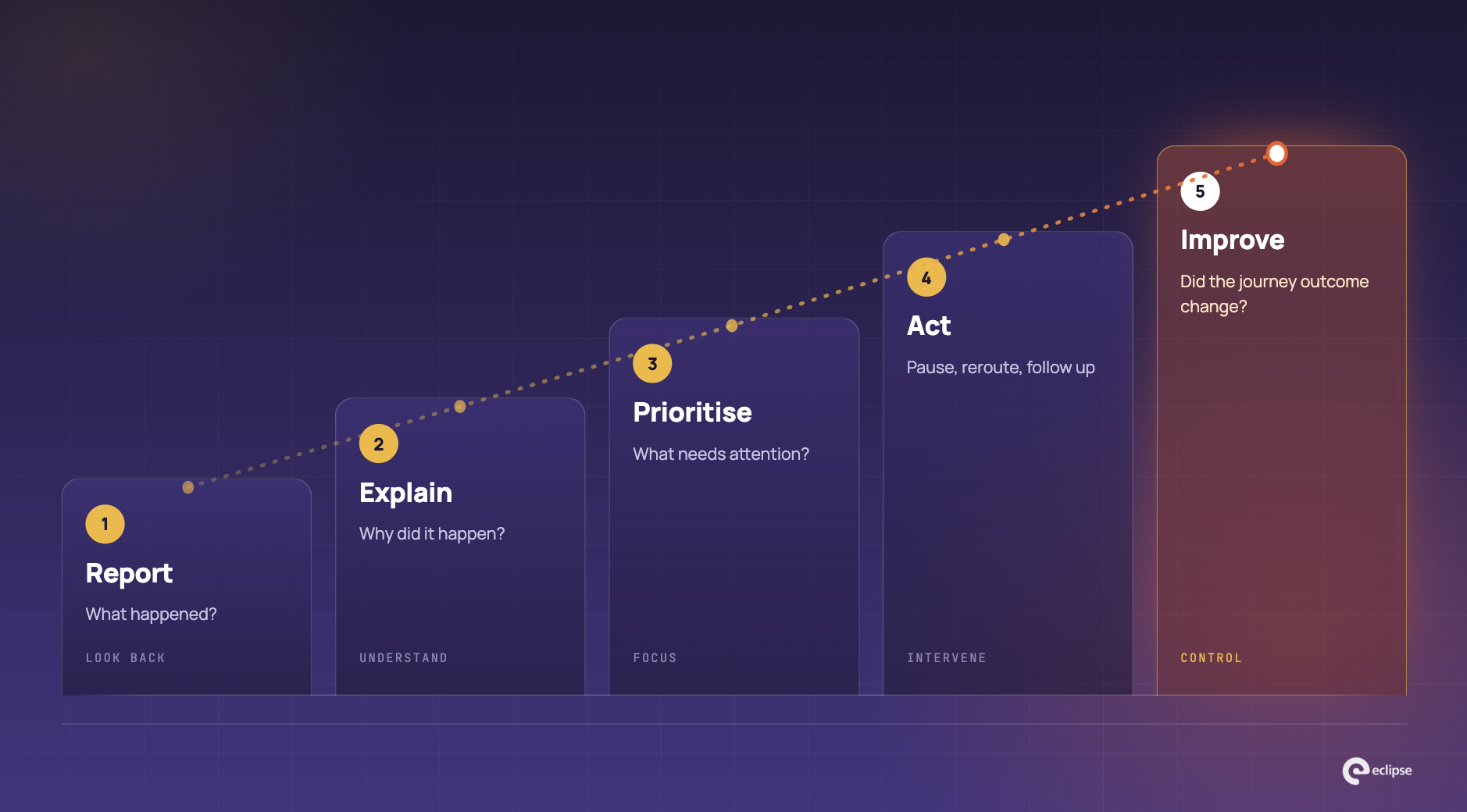
Five levels of dashboard maturity

1. Report: what happened?

This is the familiar layer: number of cases, average response time, communication volume, channel mix, delivery success. It is necessary, but retrospective. It tells you where you have been.

2. Explain: why did it happen?

A better dashboard adds context. Response time rose because one service line had a backlog. Failed communications increased after a data-source change. A spike in calls followed a confusing invoice. The team can move from observation to diagnosis.

3. Prioritise: what needs attention?

B2B service becomes more effective when the dashboard highlights risk, not just volume. Which strategic account has an unresolved communication failure? Which SLA will breach today? Which contract renewal is waiting for customer action? Which invoice reminder has reached the third attempt without response?

4. Act: what can we change from here?

The Eclipse Insights dashboard is designed around the communication chain and allows users to track and analyse communication activity. Because the dashboard is connected to the underlying process, teams can also intervene in communication flows rather than merely export another report.

5. Improve: did the intervention change the outcome?

This is the level many dashboards never reach. A team changes the reminder timing or channel. Did the outstanding action rate improve? A new invoice explanation is introduced. Did clarification calls fall? A service alert is moved from email to SMS for a particular customer group. Did acknowledgement improve?

The dashboard becomes part of a continuous-improvement loop rather than an end-of-month ritual.

What should a B2B customer service dashboard measure?

Area Useful metrics Why it matters
Account health Open critical issues, overdue actions, repeated exceptions Shows relationship risk, not only case volume.
Communication Delivery failure, open/response status, outstanding requests Shows whether customers actually received and acted on key messages.
Service flow Time to first response, time to resolution, SLA-at-risk Makes operational risk visible before breach.
Customer effort Repeat contacts, channel switches, missing-data loops Reveals friction that average handling time can hide.
Commercial moments Renewal tasks, invoice response, consent or contract completion Connects service execution with revenue and retention moments.
Change agility Time to update content, workflow or channel logic Shows whether teams can respond when requirements change.

Do not confuse more data with more insight

A dashboard can become unusable by trying to satisfy every stakeholder. The result is twenty widgets, six filters and no clear hierarchy. The better design begins with the decisions a service team makes each day.

A manager may need account-level risk and SLA performance. A communication specialist may need channel failures and scenario status. A service employee may need the last messages sent to one customer. An operations lead may need outstanding batches and exceptions. The same underlying data can support different views.

Eclipse builds tailor-made KPI-BI dashboards around the goals and roles that matter to the organisation, with real-time information and links to external data where required.

Communication data is often the missing layer

Service dashboards are usually good at cases and weak at communications. Yet many service problems begin with a message: the invoice was confusing, the reminder did not arrive, the customer missed a portal notification, or a contract document was sent to the wrong contact.

Because Eclipse manages the communication chain from data to distribution, its Insights layer can provide history at individual-customer level. That gives the service team evidence of what was sent, through which channel and where the process is now.

For B2B service, this can be extended to account context. A service agent should not need to ask the customer to forward the email they received just to understand the problem.

The dashboard is only as good as the integration underneath it

Real-time views built on overnight spreadsheets are not real-time. A dashboard that cannot reconcile account identifiers across CRM, ERP and communication systems will produce attractive inconsistency.

Eclipse uses application integration and a Canonical Data Model to structure and validate the information used across the communication process.

Turn insight into journey orchestration

The most important leap is from “we can see the problem” to “the process responds to the problem”. If a communication fails, the workflow should select a fallback. If a customer completes the action, reminders should stop. If an SLA is at risk, the account team should be alerted before the customer escalates.

Scenario management and flexible customer journeys make those next actions part of the process design.

A simple dashboard design rule

Every widget should answer one of four questions: What changed? Why does it matter? Who owns the next action? Did that action improve the outcome?

If a metric cannot support one of those questions, it may still be useful for analysis, but it probably does not deserve prime space on an operational service dashboard.

How Eclipse supports B2B service visibility

Eclipse brings together communication data, source-system integration, journey logic and operational dashboards. That combination is useful for B2B organisations because the service relationship is rarely contained in one application.

  1. Connect CRM, ERP, billing, service and communication data.
  2. Create role-based real-time dashboards around the KPIs that matter.
  3. See communication history and outstanding actions in journey context.
  4. Use scenario logic to automate reminders, fallbacks and escalations.
  5. Measure the effect of process changes rather than stopping at activity counts.

For related reading, see The Impact of Modern CCM Solutions on Operational Efficiency and Beyond Boundaries: How CRM Integration with CCM Platforms Empowers the Enterprise.

Conclusion

B2B service dashboards should not become prettier spreadsheets. Their purpose is to reduce the distance between a signal and a useful response.

When account context, service status and communication history are visible together, teams can prioritise the right work, intervene before an SLA fails and learn whether their changes actually improved the customer relationship. That is the difference between reporting and operational control.

Frequently asked questions

What makes a B2B service dashboard different from a B2C dashboard?

B2B service often involves complex accounts, multiple contacts, contracts, SLAs and commercial dependencies. The dashboard must preserve account context rather than treating every interaction as an isolated customer event.

Which metrics should appear first?

Prioritise metrics tied to decisions: SLA-at-risk, unresolved critical issues, failed communications, outstanding customer actions and repeat-contact patterns.

Should NPS or CSAT be included?

They can be useful, but they should sit alongside operational and journey measures that explain what created the experience.

Why include communication data?

Many service issues begin with something the organisation sent or failed to send. Seeing communication history helps service teams resolve the case with context.

Can dashboards trigger actions?

The strongest setup connects insight to workflow. A risk or failure can trigger a reminder, fallback channel, alert or human escalation.

How does Eclipse support B2B dashboards?

Eclipse combines real-time management dashboards with communication-chain insight, integration, a Canonical Data Model and scenario orchestration.

The Future of Forms is Now: Modernize and Streamline Forms Development


Wednesday, Aug 26th 2026

Forms look deceptively simple. A few fields, a submit button, perhaps a signature. Behind that screen sits a much larger process: identity, data validation, approvals, source systems, communication, reminders, compliance and the next action in the journey.

That is why organisations that only “put the form online” often keep the same underlying problems. Customers still enter information the organisation already knows. Teams still maintain duplicate versions. Changes still require development work. The form submits successfully, but the data lands in an inbox and somebody manually starts the next process.

Modern forms development fixes the chain, not just the screen.

The static-form model has reached its limit

The old model was designed around documents: create a PDF or web version, expose every possible field, collect the answer and hand it off. It works for simple cases. It becomes expensive when the form needs conditional logic, multiple languages, mobile access, signatures, attachments, accessibility, pre-filled data or integration with other systems.

The maintenance problem is just as serious. The same address block or consent section may exist in dozens of forms. A regulatory wording change becomes a hunt across copies. Small changes queue behind development priorities because the form is owned as code rather than as a reusable business component.

What a modern form should do in 2026

1. Ask only relevant questions

Eclipse FlexForms supports adaptive questions, so a form can change according to the customer’s previous answers. A person who selects “no dependants” should not scroll through dependant details. A customer whose address is already verified should not be asked to re-enter it without reason. FlexForms can also use known customer or case data to determine which questions each person receives. If an email address is already available, it does not need to be requested again. If details of an insurance claim are already known, relevant fields can be pre-filled or skipped. This allows one scalable form design to create a more relevant route for each customer while remaining within controlled business rules.

Relevance is not only a UX improvement. It reduces invalid data, abandonment and downstream clarification work.

2. Reuse components instead of rebuilding forms

Modern forms should be assembled from reusable sections and governed components. Identity, contact details, declarations, signatures and standard instructions should not be recreated from scratch each time.

FlexForms includes reusable form sections and customisable templates, which lets teams make repeatable patterns part of the development model.

3. Work properly on mobile

A responsive form is now a baseline requirement. Customers often open the request from a phone, especially when the journey starts with SMS, WhatsApp or email. A form designed for a desktop monitor creates friction at exactly the moment the organisation is asking the customer to do work.

4. Build accessibility into the form, not into the remediation plan

The European Accessibility Act has applied since 28 June 2025. At the design level, WCAG 2.2 and the W3C forms guidance are useful references for labels, instructions, errors, keyboard use and other accessibility requirements.

Accessibility also improves the form for everyone. Clear labels, understandable error messages, logical structure and sensible instructions reduce effort across the whole user base.

FlexForms can also support multilingual form journeys. Assisted translation helps teams create and maintain form variants across a wide range of languages without rebuilding the form logic for every version.

5. Treat submission as the start of the next action

The most common design failure is a form that ends with “Thank you for your submission” while the real process continues elsewhere. A connected form should update the appropriate system, confirm what happened, trigger the next workflow and make the new status visible.

Eclipse connects forms to scenario management, application integration and omnichannel communication. The form becomes part of the customer journey rather than a standalone web asset.

Traditional forms versus connected forms

Traditional forms Modern connected forms
Built and maintained separately Reusable sections and templates
Same questions for every user Questions adapt to known data
Known data is re-entered Trusted data can pre-fill fields
Submission creates an email or file Submission updates systems and starts the next workflow
Accessibility is checked late Accessibility is built in from the start
Changes wait for a development cycle Governed business users manage more changes
Success = form submitted Success = journey completed with less effort

Forms are becoming a two-way communication channel

The shift from CCM to CXM is changing the role of forms. Traditional CCM was heavily outbound: send a letter, statement or policy. Modern CXM also needs reliable inbound capture as part of the same journey. The customer reads, responds, uploads, signs, confirms or corrects information, and the organisation can act on that input. This makes forms a practical tool for data enrichment. Instead of asking customers to complete broad generic forms, organisations can securely request only the information that is missing or outdated. A local municipality, for example, can ask constituents a controlled set of questions to enrich resident data for a specific service or programme.

This is part of the broader transition described in The Evolution of CCM to CXM. It is also why the Eclipse platform treats forms, content, scenarios and channels as connected capabilities.

Where AI helps and where governance still matters

AI will accelerate parts of forms development: suggesting clearer labels, identifying duplicate questions, translating content, generating test cases and helping teams analyse abandonment patterns. But forms often sit at important decision points, so AI should work inside clear governance.

A model should not silently invent eligibility logic, mandatory declarations or regulatory wording. Those rules need approved sources, human ownership and testable change control. The future of forms is intelligent, but it is not ungoverned.

A practical modernisation roadmap

  1. Inventory forms and identify duplicates, shared sections and high-volume pain points.
  2. Start with one journey where form friction creates measurable calls, delay or manual work.
  3. Connect the form to trusted source data so customers are not asked for information the organisation already has.
  4. Rebuild the interaction with adaptive logic, mobile design and accessibility from the start.
  5. Connect submission to workflow, communication and status updates.
  6. Measure completion, abandonment, correction rate, time to complete and downstream manual effort.
  7. Reuse the successful components in the next form rather than starting again.

How Eclipse FlexForms fits into the communication platform

FlexForms is part of the Eclipse CCM platform rather than a separate form builder. The same environment used to manage outbound customer communications can also provide a controlled inbound route for collecting customer data. This creates a more consistent security and governance model and reduces the need to move form data through disconnected tools.

At scale, scenario management can use customer, case and journey data to route the right form to the right person automatically. The form itself can adapt to the data already known, ask only for what is missing and trigger the next communication or workflow when the customer responds. Each interaction can be tailored to the customer while the underlying logic remains controlled, reliable and repeatable for the organisation.

  1. Create scalable, data-driven forms in the online CCM portal for high-volume and repeatable customer journeys.
  2. Use adaptive questions, media, signatures, tables, lists and custom HTML elements.
  3. Reuse form sections and templates across use cases.
  4. Provide a mobile-friendly experience and secure access using one-time passwords where appropriate.
  5. Connect the result to customer data, scenario logic, content and follow-up channels.
  6. Monitor the wider journey through Eclipse Insights and dashboards, then use completion and response data to improve form logic and scenario routing over time.

Common use cases include onboarding, compliance, remediation, audits, inspections, assessments, registration, feedback and service requests. Explore Eclipse FlexForms or the broader Eclipse end-to-end platform.

Conclusion

The future of forms is not more forms. It is fewer duplicated forms, smarter questions, reusable components and a direct connection between what the customer submits and what the organisation does next.

When forms become part of the communication journey, development gets easier to govern and the experience becomes easier to complete. That is the modernisation opportunity: not a nicer PDF, but a faster path from customer input to customer outcome.

For more 2026 communication ideas, see 26 Communication Trends for 2026 That Every Business Should Know and the latest articles on the Eclipse news page.

Frequently asked questions

What is a modern digital form?

A modern form is adaptive, mobile-friendly, accessible, secure and connected to source systems and workflows. It does more than collect fields; it moves the journey forward.

What are adaptive questions?

Adaptive questions change according to known data or previous answers, so users only see fields that are relevant to their situation.

Why are reusable sections important?

They reduce duplicate development and make regulatory, brand or wording changes easier to apply consistently across multiple forms.

How does accessibility affect forms development?

Accessible labels, instructions, error handling, keyboard operation and structure make forms usable for people with disabilities and often improve completion for everyone.

Can forms trigger communications automatically?

Yes. When forms are connected to a workflow or CCM platform, a submission can update a system, send a confirmation, request approval, start a reminder sequence or move the customer to the next stage.

What is Eclipse FlexForms?

FlexForms is Eclipse’s data-driven form capability within the CCM platform, supporting adaptive questions, reusable sections, mobile use, signatures, secure access and integration with wider communication workflows.

Modernise your forms development

See how Eclipse FlexForms turns forms into a connected part of the customer journey, from adaptive questions to automated follow-up.

Request a demo

From Annual Statements to Fault Reports: Customer Communication at a Water Utility


Thursday, Aug 20th 2026

Learn how water utilities can connect annual statements, meter readings, planned works and fault updates through one customer communication approach.

Water is an essential service that is easy to take for granted until something changes. A customer may barely think about the utility for months, then need immediate answers about an annual statement, an unexpectedly high reading, planned street works, low pressure or an interruption in supply.

Those moments range from predictable to urgent, but the customer does not care which system or department owns them. They expect one organisation to know the situation, explain it clearly and keep them informed until the issue is resolved.

For a water utility, the communication journey runs from quiet routine to operational urgency. The platform and process must be ready for both.

One customer relationship, many operational systems

A typical water utility relies on several specialised systems: customer and contract administration, billing, metering, geographic information, asset management, field service, work planning, incident management, payments and CRM. Each system owns valuable information. Problems arise when each one also becomes an independent communication channel.

That creates familiar symptoms: the contact centre cannot see the fault message that was sent; a planned-work letter uses an old address; a payment reminder ignores an open billing complaint; or an incident update is published on the website but not sent to the customers most directly affected.

A modern customer communication platform provides a coordination layer. It does not replace the operational systems. It uses their events and data to create consistent communication, choose the right channel and maintain a complete record.

The water customer communication lifecycle

1. Moving in, moving out and new connections

The journey should confirm the address and service date, request only the necessary information, explain billing and payment, and provide a clear first point of contact. A move-out journey must coordinate the final reading, final statement and refund or balance without leaving loose ends.

2. Meter reading requests and usage corrections

A reading request is more effective when it includes a direct, mobile-friendly route to respond. With Eclipse FlexForms, the customer can enter the reading, upload a photo if required, correct contact details and receive confirmation within the same communication flow. Adaptive questions can handle exceptions without presenting every customer with a long generic form.

3. Consumption insight and leakage awareness

Usage communication should do more than display a number. It can compare consumption with an earlier period, flag an unusual pattern, explain possible causes and offer practical next steps. The objective is to help the customer act before a high bill or a suspected leak becomes a complaint.

4. Annual statements and payment communication

The annual statement is a trust document. It must show how consumption, rates, previous payments and the final balance fit together. When the result is unexpected, the communication should answer the first questions inside the document and provide a direct route to dispute, arrange payment or submit corrected information.

Payment reminders should use current case context. A customer waiting for a correction should not continue through an automated escalation sequence as though nothing has happened. Good orchestration uses CRM, billing and payment status before deciding the next message.

5. Planned maintenance and local works

Planned work communication needs precise geography, timing, expected impact and practical guidance. Customers should know whether supply will stop, whether pressure or appearance may change, what they should do beforehand and where to find updates. Reminders can be timed closer to the work, with a completion notice when the service is normal again.

6. Faults, interruptions and urgent service updates

During an incident, silence creates its own story. Customers call, search social media and compare messages with neighbours. The first update does not need every answer, but it should acknowledge the issue, define the known impact, explain what is being done and promise the next update at a credible time.

7. Complaints and service recovery

A complaint is not only a case in CRM. It is a sequence of acknowledgements, evidence requests, status updates, decisions and follow-up. The communication should preserve context, avoid repeated questions and show that the utility has understood both the technical issue and its effect on the customer.

Designing a fault communication scenario

Fault communication is where orchestration becomes visible. The process can be prepared before the incident, then populated with live operational data when an event occurs.

  1. Detect or register the incident in the operational system and identify the affected area, assets and customer records.
  2. Classify the event by urgency, expected duration, safety implications and customer impact.
  3. Trigger an initial message using a pre-approved content pattern, with the facts that are known and a time for the next update.
  4. Choose channels based on urgency, customer preference and available contact data; use fallback routes for critical messages.
  5. Update the same journey as field information changes, rather than creating disconnected one-off messages.
  6. Confirm restoration, explain any after-effects and provide a simple route to report a continuing problem.
  7. Review delivery, responses, call volumes and complaints to improve the scenario for the next event.

Eclipse scenario management allows triggers, actions, timing, channel sequences and “if-then” paths to be configured visually. This makes it possible to prepare routine and emergency journeys without hard-coding every variation into the source system.

What customers need in an incident message

Customer question Communication should provide
Is my address affected? A specific area, address-level indicator or direct confirmation where the data allows it.
What has happened? A plain-language description without speculation or unnecessary technical detail.
What should I do? Practical instructions, including any safety, hygiene or usage guidance relevant to the event.
When will it be fixed? The best current estimate, clearly labelled as an estimate, plus the next update time.
Where can I get help? A service page, form, phone route or accessible alternative appropriate to the urgency.
Will you keep me informed? A consistent update cadence and confirmation when the issue is resolved.

Data integration is the foundation

The quality of communication depends on the quality and timeliness of the data behind it. Eclipse integration capabilities can connect customer, billing, metering, GIS, field-service and incident systems, then structure the relevant information through a canonical data model.

This matters because each communication requires a different slice of the data. An annual statement needs consumption and payment history. A planned-work notice needs location, work schedule and impact. A fault message needs the current incident state, affected area and the customer’s contact and channel preferences. The communication layer should assemble what is needed without copying entire source systems into another database.

One content foundation for routine and urgent messages

Water utilities often have hundreds of variants of letters, emails, portal texts and service scripts. Central content and template management turns that library into reusable components: approved explanations, address and account blocks, accessibility patterns, local contact details, incident instructions and brand elements.

The benefit is not only consistency. It is speed. A policy, rate, service or wording change can be made once and applied wherever the component is used, with the appropriate approval workflow.

Channel choice should follow the task

An annual statement may need a secure portal, accessible digital document, email notification or print. A meter-reading reminder may work through email or SMS with a direct form link. An urgent interruption may require SMS, push or messaging plus a continuously updated service page. Eclipse omnichannel delivery keeps these outputs coordinated and records whether the customer received or acted on the message.

The goal is not “digital first” at any cost. It is appropriate communication: digital where it improves speed and action, print where it remains necessary, and assisted service for customers who need human support.

Build for peaks, resilience and critical-service obligations

A major fault can create a sharp communication peak at the same time employees and systems are under pressure. Eclipse’s article on scalable CCM for peak loads explains why resilient design must cover data, composition, prioritisation, channel delivery and monitoring – not only raw infrastructure capacity.

Drinking water is among the critical sectors addressed by European cyber-resilience policy. The ENISA overview of cybersecurity for critical sectors and the EU NIS2 framework reinforce the need for secure, continuous and well-governed operations. Customer communication is part of that resilience because people need dependable information when normal service is disrupted.

Measure more than message volume

A water utility should be able to see whether communication achieved its purpose. Useful measures include successful delivery, time to first incident update, form completion, corrected readings, payment outcomes, repeat contacts, complaints, opt-outs and the percentage of customers reached before they called.

Eclipse dashboards bring communication history, processing steps and customer responses into an operational view. This supports real-time control and longer-term improvement. The Eclipse article on modern CCM and operational efficiency provides additional examples of how central control reduces manual work and fragmented processes.

A practical route to modernisation

A water utility does not need to modernise every communication at once. A phased approach can create value while reducing delivery risk.

  1. Map the highest-volume and highest-risk journeys, from annual statements to incident updates.
  2. Identify duplicate templates, manual hand-offs and data gaps that create avoidable calls or delays.
  3. Choose a first journey with measurable operational and customer value.
  4. Connect the required source systems and establish a reusable data model.
  5. Centralise content, approvals and channel variants for that journey.
  6. Automate triggers, reminders, fallbacks and response capture.
  7. Use delivery and outcome data to improve the journey and extend the model to the next use case.

The warning signs described in 5 signs your legacy CCM platform is costing customers are particularly relevant to utilities: slow content changes, reactive contact-centre demand, limited channel reach and poor operational visibility.

How Eclipse supports water utilities

Eclipse combines an end-to-end CCMaaS platform with implementation and managed services. We help organisations connect operational systems, standardise data, rationalise content, automate communication scenarios, add interactive forms and coordinate delivery across channels.

Our customer interaction services can support a targeted journey such as meter reading or incident communication, as well as a broader transition from legacy output management to a managed communication platform.

From documents to a dependable communication service

Annual statements and fault reports may sit at opposite ends of the operating calendar, but they depend on the same fundamentals: trusted data, approved content, appropriate channels, clear next actions and visibility into the outcome.

When those capabilities are connected, the water utility communicates as one organisation. Routine interactions become easier, urgent interactions become calmer, and customers spend less time trying to work out what is happening.

Frequently asked questions

What communications should a water utility manage through CCM?

Common examples include onboarding and moving, meter-reading requests, annual statements, payment reminders, tariff notices, planned-work notifications, fault updates, complaint correspondence and service-recovery messages.

Can a CCM platform connect with GIS and outage systems?

Yes. The communication layer can receive location and incident data from GIS, asset, field-service or outage systems and combine it with customer and channel data to identify and inform the affected audience.

How can a water utility collect meter readings digitally?

A secure interactive form can be linked from email, SMS or a portal, adapt questions to the customer’s situation, accept supporting information and return the result to the billing or metering process.

What makes a good fault update?

It should confirm the affected area, state what is known, explain what the customer should do, give the best current restoration estimate, set a time for the next update and provide a clear help route.

Should all water communication become digital?

No. The objective is channel appropriateness and inclusion. Digital channels improve speed and interactivity, while print and assisted service remain important for some customers and communication types.

How does Eclipse help with legacy communication environments?

Eclipse can assess current journeys, connect existing applications, migrate and rationalise templates, implement scenario and channel control, and operate the environment as a managed CCM service.

Connect routine billing and urgent service communication

Eclipse can help your water utility build one governed communication layer across customer, billing, meter, field and incident systems.

Request a demo